

 NZ
NZ
 USA
USA Canada
 UK
UK EU
EU Australia
 Japan
Japan Singapore
 UAE
UAE India
India South Korea
DX3 Triple 4K Display Universal Docking Station - with 100W Power Delivery




DX3 Triple 4K Display Universal Docking Station - with 100W Power Delivery
Regular price
$499.99
Sale price
Regular price
$499.99
Couldn't load pickup availability
Specifications
Specifications

SMALL DESK FOOTPRINT. BIG PERFORMANCE
The DX3's compact design occupies minimal desk space to deliver premium performance. It's the ideal dock for a distraction-free desk set up focused on productivity.

USB-C & USB-A LAPTOP COMPATIBLE
IT decision-makers and organisations have more options with the DX3. It supports USB-C and USB-A laptop deployment.
DUAL/TRIPLE DISPLAY ON M1/M2 MAC
M1/M2 Mac users can work on up to three screens when they plug into the DX3.


Frequently Asked Questions
General
What laptops are compatible with the DX3?
The DX3 is compatible with Windows, MacBooks (even M1 MacBooks) and Chromebooks.
Does the DX3 require any additional software installation?
The DX3 is a DisplayLink enabled dock, we recommend installing the DisplayLink software which is free to download via:
https://www.synaptics.com/products/displaylink-graphics/downloads
https://www.synaptics.com/products/displaylink-graphics/downloads
What sort of display output/connections does the DX3 support?
The DX3 uses x3 DisplayPort ports, we recommend using direct DisplayPort (M) to DisplayPort (M) cables to connect to your monitors.
However, if the user only has HDMI monitors, we recommend using an ‘Active’ cable or adapter when setting up with the DX3.
Example: 'Active' DisplayPort to HDMI adapter (Part No: ULDPHDA-SGR) or an ‘Active’ DisplayPort to HDMI cable (Part no: ULDPHD02-SGR).
However, if the user only has HDMI monitors, we recommend using an ‘Active’ cable or adapter when setting up with the DX3.
Example: 'Active' DisplayPort to HDMI adapter (Part No: ULDPHDA-SGR) or an ‘Active’ DisplayPort to HDMI cable (Part no: ULDPHD02-SGR).
My laptop has Thunderbolts 3 or 4 ports; will it be compatible with the DX3?
Thunderbolts 3 and 4 use the same connector as USB-C. Hence the DX3 is compatible with Thunderbolt 3 and/or 4 enabled laptops.
NOTE: Thunderbolt transfer speeds will not be achievable.
NOTE: Thunderbolt transfer speeds will not be achievable.
How do I get three 4K monitors to work on the ALOGIC DX3 docking station?
To run three 4K displays on the ALOGIC DX3 Dock, your laptop must be connected via a USB-C or Thunderbolt 3/4 port that supports DisplayPort Alt Mode. Ports 1 and 2 run on built-in DisplayLink technology, while the 3rd DisplayPort uses native USB-C DP Alt Mode passthrough. On legacy USB-A host laptops, display output is limited to two external displays via DisplayLink.
Does the DX3 dock support multiple external monitors on base Apple M1, M2, and M3 MacBooks?
Yes. Base M1, M2, and M3 MacBooks natively restrict external monitor output to a single screen over USB-C. The ALOGIC DX3 uses DisplayLink technology on DisplayPorts 1 and 2 to drive two extended 4K monitors. If the MacBook host supports DP Alt Mode, all three external 4K displays can be extended simultaneously.
Does the ALOGIC DX3 come with a power supply, and how much power does it deliver to my laptop?
Yes. The DX3 Docking Station includes a 135W AC external power adapter. It delivers up to 100W Power Delivery (PD 3.0) over the primary USB-C cable, supplying ample power to fast-charge 13-inch, 14-inch, and 16-inch laptops (including MacBook Pro, Dell XPS, Lenovo ThinkPad, and HP Spectre) while powering connected peripherals.
Do I need to install drivers to use the ALOGIC DX3 docking station?
Yes. To activate DisplayPort 1 and DisplayPort 2 on macOS, Windows, or ChromeOS, you must install the free Synaptics DisplayLink driver. All peripheral ports, Ethernet, audio, and card readers function automatically upon connection.
Can I use the DX3 dock with an older laptop that only has USB-A ports?
Yes. The package includes a USB-C cable with an integrated USB-A adapter. When connected via USB-A, DisplayLink technology enables up to two external 4K displays and full access to data ports, Ethernet, and card readers. Laptop charging via Power Delivery is not supported over USB-A connections.
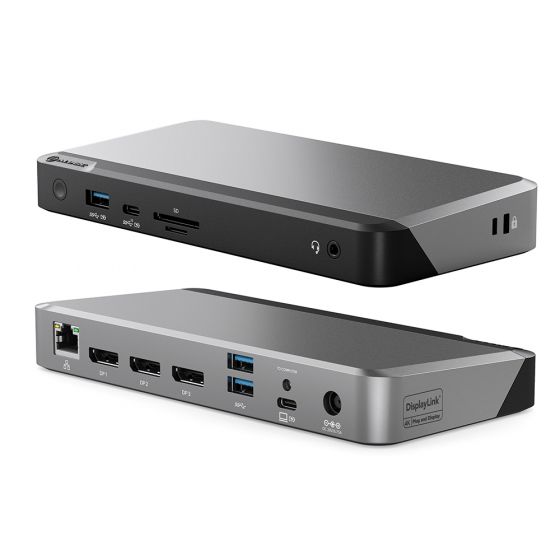
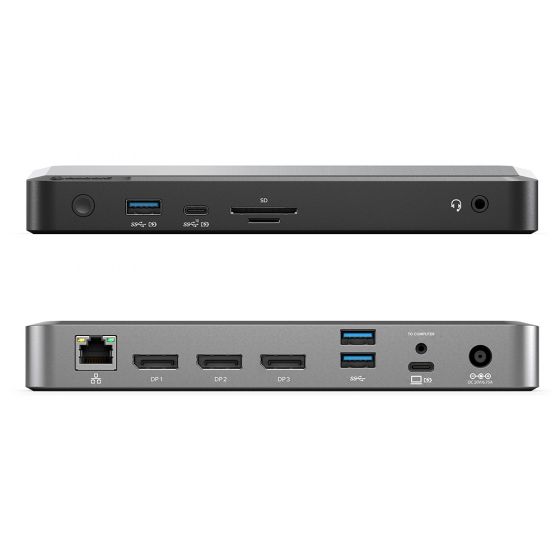
What expansion connections are available on the ALOGIC DX3 Universal Dock?
"The ALOGIC DX3 features 11 workstation expansion ports:
Video: 3x DisplayPort 1.4 / DP++ outputs (Up to Triple 4K @ 60Hz).
USB Ports: 1x USB-C 3.2 Gen 2 (10Gbps with BC 1.2 fast charge), 1x USB-A 3.2 Gen 1 (5Gbps with BC 1.2 fast charge), and 2x USB-A 3.2 Gen 1 (5Gbps) ports.
Networking & Audio: 1x RJ45 Gigabit Ethernet port (1Gbps) and 1x 3.5mm TRRS audio/mic jack.
Storage & Security: SD 4.0 and MicroSD 4.0 card readers, built-in security lock slot, and VESA mount capability."
Video: 3x DisplayPort 1.4 / DP++ outputs (Up to Triple 4K @ 60Hz).
USB Ports: 1x USB-C 3.2 Gen 2 (10Gbps with BC 1.2 fast charge), 1x USB-A 3.2 Gen 1 (5Gbps with BC 1.2 fast charge), and 2x USB-A 3.2 Gen 1 (5Gbps) ports.
Networking & Audio: 1x RJ45 Gigabit Ethernet port (1Gbps) and 1x 3.5mm TRRS audio/mic jack.
Storage & Security: SD 4.0 and MicroSD 4.0 card readers, built-in security lock slot, and VESA mount capability."
